






Checking your WAEC result online is one of the most important moments for any secondary school graduate in West Africa. Whether you are eager to confirm your grades, apply for admission, or prepare documents for employment, knowing how to check my WAEC result online correctly can save you time, stress, and costly mistakes.
What Is WAEC and Why Your Result Matters
The West African Examinations Council (WAEC) is the official examination body responsible for conducting the West African Senior School Certificate Examination (WASSCE) in countries such as Nigeria, Ghana, Sierra Leone, The Gambia, and Liberia.
Your WAEC result is essential because it is required for:
- University and polytechnic admissions
- College of education enrollment
- Scholarships and international applications
- Employment and professional certifications
This is why many students ask every year:
How will I check my WAEC result online safely and correctly?
What You Need Before You Check Your WAEC Result Online
Before attempting to check your WAEC result online, make sure you have the following ready:
Mandatory Requirements
- Examination Number (10-digit number)
- Examination Year (e.g., 2024, 2025)
- Examination Type (School Candidate or Private Candidate)
- WAEC Scratch Card PIN
- WAEC Scratch Card Serial Number
- A phone, tablet, or computer
- A stable internet connection
Without these details, you will not be able to complete the process of checking your WAEC result online.
Official WAEC Website for Checking Results
The only official and trusted website to check WAEC results online is:
This website is managed directly by WAEC and is the safest platform to use. Avoid third-party websites claiming to offer free WAEC result checking, as they may:
- Steal your PIN
- Display fake results
- Compromise your personal data
How Will I Check My WAEC Result Online? (Step-by-Step Process)
This section directly answers the main question:
How will I check my WAEC result online?
Follow these steps carefully:
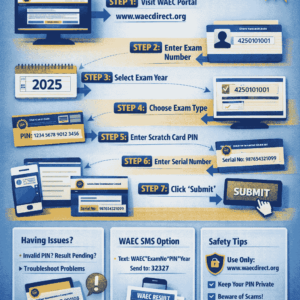
Step 1: Visit the Official WAEC Result Portal
Open your browser and go to:
👉 waecdirect.org
Step 2: Enter Your Examination Number
Type your 10-digit WAEC Examination Number correctly.
Example: 4250101001
Step 3: Select Your Examination Year
Choose the year you wrote the exam (e.g., 2024 or 2025).
Step 4: Select Your Examination Type
Choose one:
- School Candidate (May/June)
- Private Candidate (GCE)
Step 5: Enter the Scratch Card PIN
Carefully input the PIN found on your WAEC scratch card.
Step 6: Enter the Serial Number
Type the serial number exactly as shown on the card.
Step 7: Click “Submit”
Click the Submit button and wait a few seconds.
Step 8: View and Print Your Result
Your WAEC result will appear on the screen.
You can:
- Screenshot it
- Print it
- Save it as a PDF
This completes the process of how will I check my WAEC result online successfully.
Common Problems When Checking WAEC Results and How to Fix Them
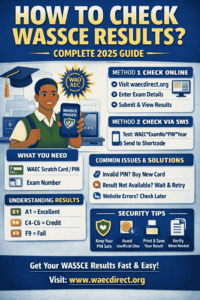
Even when you follow all steps correctly, issues may still arise. Below are common problems and solutions:
Problem 1: Invalid Examination Number
Solution:
Double-check the digits and confirm the correct exam year.
Problem 2: Scratch Card Already Used
Solution:
Each PIN can only be used five times. Buy a new card if exhausted.
Problem 3: Result Not Yet Available
Solution:
Wait a few days. WAEC releases results in batches.
Problem 4: Website Not Loading
Solution:
Try again during off-peak hours (late night or early morning).
Understanding these issues helps you confidently answer how will I check my WAEC result online without frustration.
Alternative Ways to Check WAEC Results
If the online portal is unavailable, you can use other approved methods.
A. Checking WAEC Result via SMS (Nigeria Only)
Format:
WAEC*ExamNo*PIN*ExamYear
Send to:
32327
Example:
WAEC*4250101001*123456789012*2025
⚠ SMS charges apply.
B. Checking WAEC Result at WAEC Offices
You can visit any WAEC zonal or branch office with valid identification.
C. Through Schools
Some schools provide printed result slips after official release.
Safety Tips When Checking Your WAEC Result Online
To protect your result and personal data:
- Never share your PIN online
- Avoid cybercafés with keyloggers
- Log out after checking
- Use the official WAEC website only
These precautions ensure a secure experience when answering how will I check my WAEC result online.
Frequently Asked Questions (FAQs)
FAQ 1: Can I Check My WAEC Result Without a Scratch Card?
Answer:
No. A WAEC scratch card is mandatory for checking your WAEC result online unless your school provides bulk access.
FAQ 2: How Many Times Can I Use One WAEC Scratch Card?
Answer:
A single WAEC scratch card PIN can be used up to five times only.
FAQ 3: Is It Possible to Check WAEC Result on Mobile Phone?
Answer:
Yes. You can check your WAEC result online using any smartphone with internet access.
Also Read:
Final Conclusion
So, how will I check my WAEC result online?
The answer is simple: prepare your details, visit the official WAEC portal, follow the step-by-step process, and avoid third-party websites.
By following this guide, you now have a complete, safe, and reliable understanding of how to check my WAEC result online without confusion or errors. Whether you are checking for admission, employment, or personal records, this process remains the most trusted method.












+ There are no comments
Add yours